

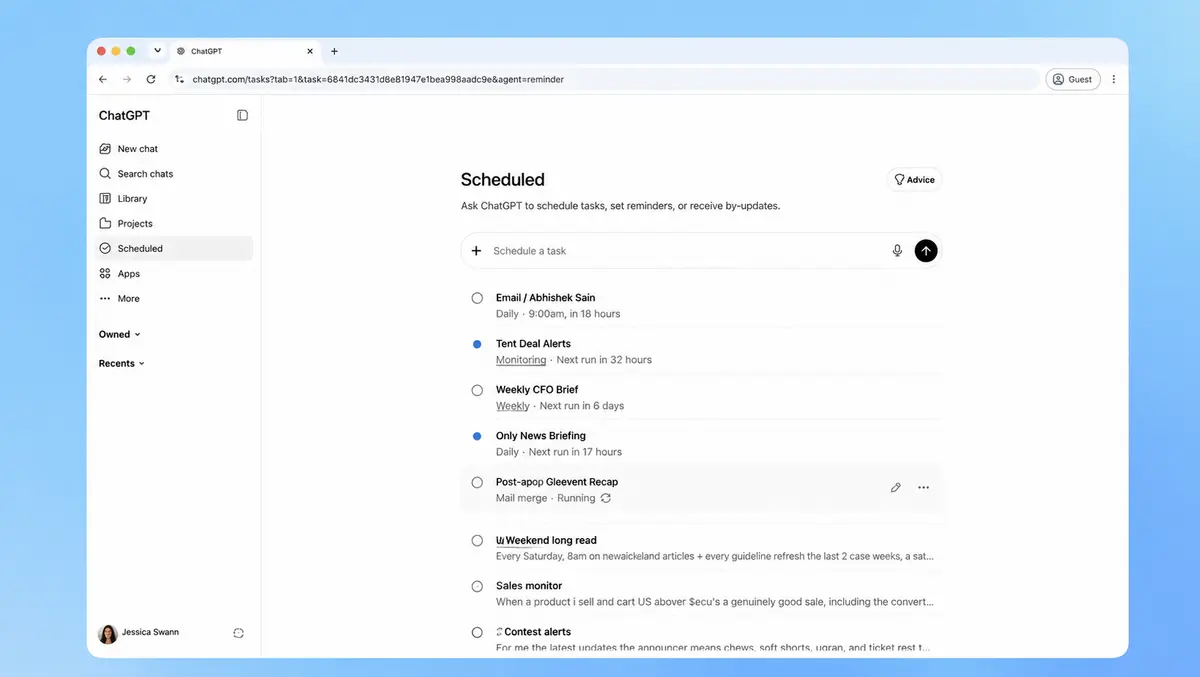

OpenAI has updated scheduled tasks in ChatGPT, adding a dedicated management page and expanding how users can set reminders and recurring checks.
The update adds a new Scheduled page in the ChatGPT sidebar on web and mobile, where users can view active tasks, see when each will run next, and pause, resume, edit, or delete them. Users can create one-off tasks, recurring jobs, and monitoring tasks that check for changes and send a notification only when there is something to report.
OpenAI says the system is now faster and more reliable. It also supports broader time windows such as morning, afternoon, or evening, instead of requiring a specific time.
The feature is rolling out globally to Plus, Pro, Business, and Enterprise users on the web and in the mobile app. It is not available in the desktop app or the Codex app.
Active task limits vary by subscription tier. Go users can have up to three active tasks, Plus users up to five, Business and Edu users up to 10, and Pro and Enterprise users up to 15, according to OpenAI's product notes. Tasks cannot run more than once per hour, and unattended tasks may pause automatically after a period of inactivity.
How it works
Users can set up a task from the Scheduled page or by typing a request into ChatGPT, such as asking for a delivery update or a regular briefing. Once a task is created, notifications can be sent through push alerts, email, or both, depending on the settings enabled in ChatGPT and the user's browser or mobile device permissions.
Monitoring tasks are designed for periodic checks rather than event-driven automation. These tasks can search the web and check connected apps for changes, remember previous runs, and stop when an end condition is met.
Scheduled tasks can work with connected apps such as Gmail when those apps are available for an account or workspace. In Business and Enterprise environments, app access and permissions may depend on administrator settings, and some actions may require approval.
The feature also has access limits. If a task is created inside a project that includes files, it cannot access those project files. Voice chats and GPTs are not supported with tasks, and scheduled tasks do not support webhooks.
Product shift
Alongside the update, OpenAI is withdrawing Pulse, a feature that carried out asynchronous research based on a user's past chats, memory, and feedback, then delivered proactive summaries the next day. Its proactive updates are being folded into scheduled tasks instead.
Pro users will retain access to Pulse for 14 days. After that, users who want similar daily updates will need to create a scheduled daily briefing based on their interests and previous chats. The move points to a broader effort by OpenAI to consolidate proactive and recurring work inside ChatGPT rather than split those functions across separate products.
OpenAI has also changed how users manage tasks. Earlier controls were available through notification settings and individual task menus in chat, but the new Scheduled page creates a single interface for the full list of tasks. If a user deletes a chat tied to a scheduled task, that task will automatically pause, although deleting a task will not delete the associated chat.
Wider push
The update reflects growing competition among AI providers to make chatbots act less like reactive question-and-answer tools and more like assistants that can carry out work over time. Reminder systems, recurring reports, and change monitoring are particularly relevant to paid users, who are more likely to use the software for work and ongoing personal administration.
By limiting runs to once an hour and capping active tasks by plan, OpenAI appears to be balancing demand for automation with the operational costs of running jobs in the background. The availability split also gives higher-paying customers access to more concurrent tasks, which may help distinguish premium plans from lower-cost subscriptions.
For business customers, app integration may be as important as the scheduling changes. OpenAI says tasks can use information from health and finance features when users have set them up, citing examples such as portfolio updates after market close or a biweekly spending review. In managed workspaces, though, admins may restrict persistent permissions or block some app actions, which could limit how far tasks can go.